RU EN
← ALL PROJECTS

CASE 05 · MOBILE

Leskovo A mobile app for the residents of a gated village: balance, invoices, requests and guest passes — from a phone, without a single call

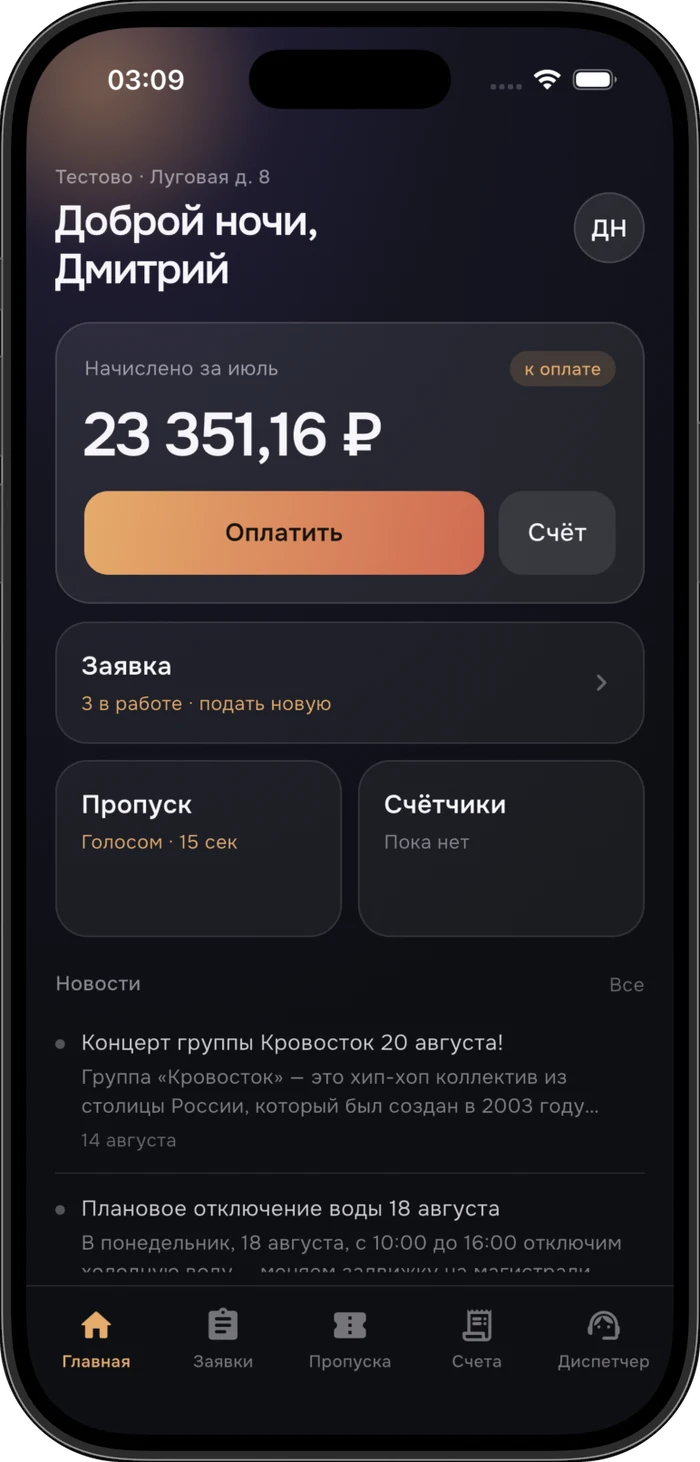
App home screen: the month’s charge, requests, passes and village news
Home screen
Charges, requests, passes and news
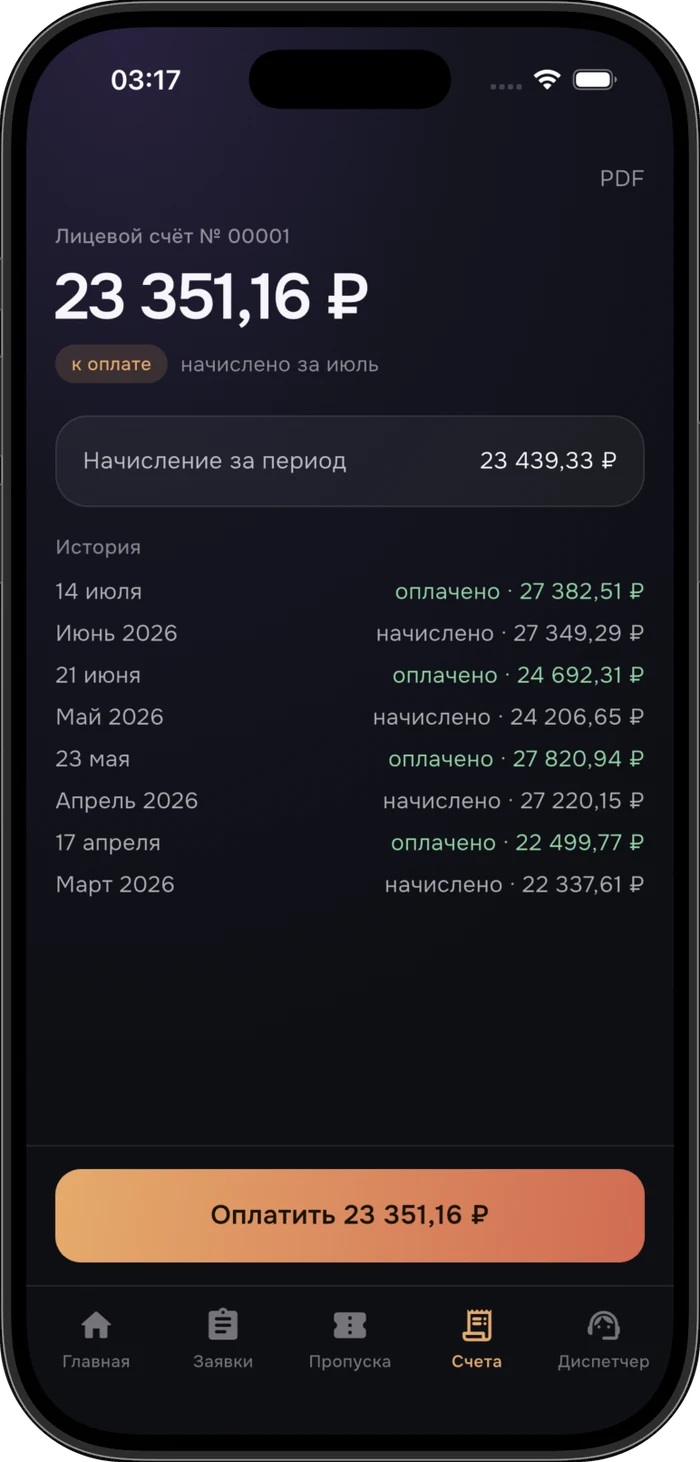
Account screen: the charge for the period, payment history and the pay button
Account and history
Charges, payments and a PDF invoice
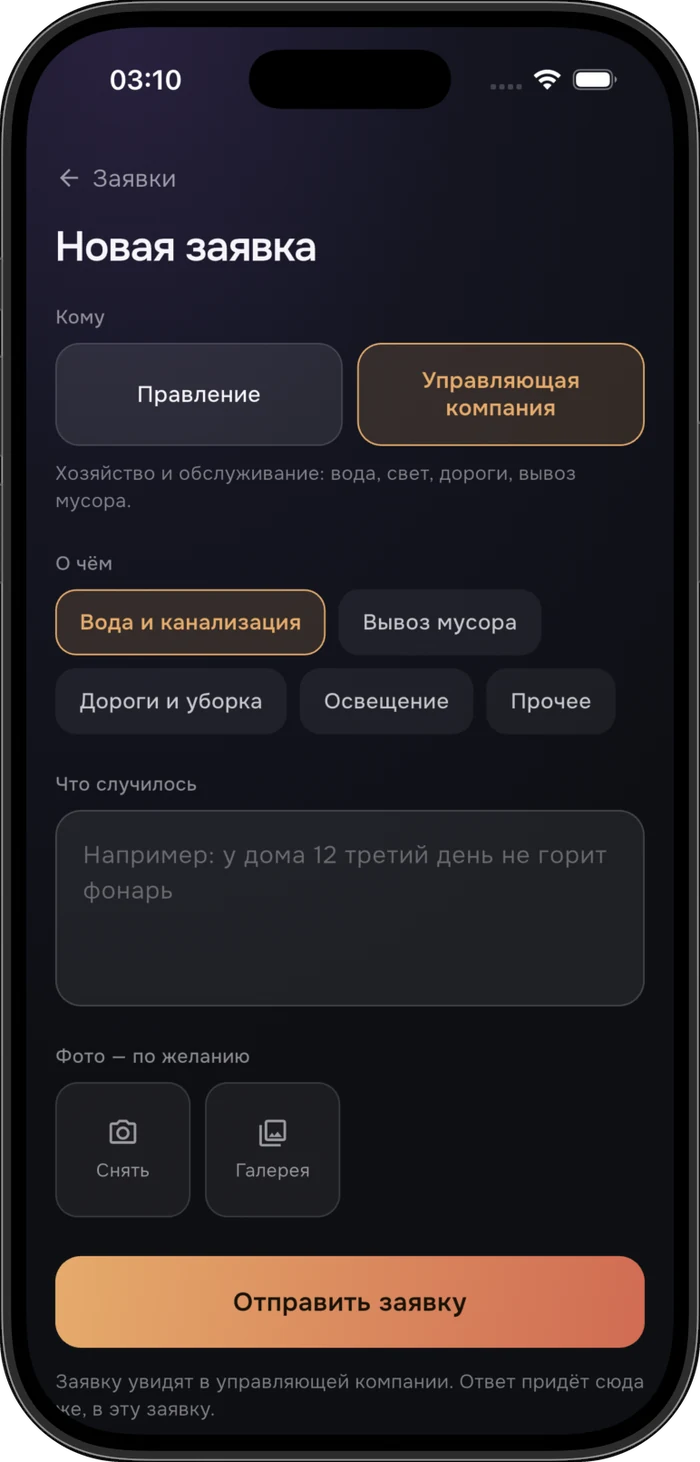
New request screen: choosing the recipient and topic, describing the problem, attaching photos
New request
Recipient, topic, description and photos
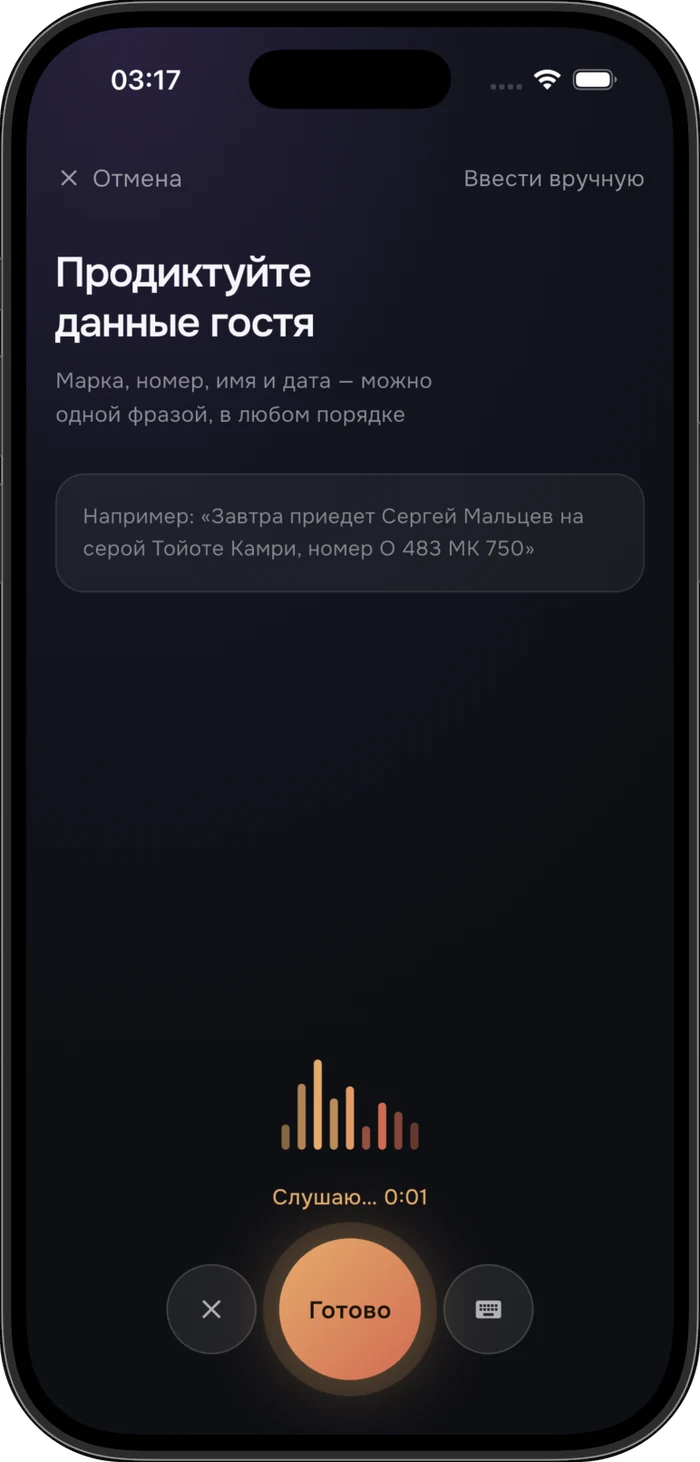
Issuing a pass by voice: the app listens and parses a sentence with the guest’s details
A pass by voice
One sentence instead of six form fields
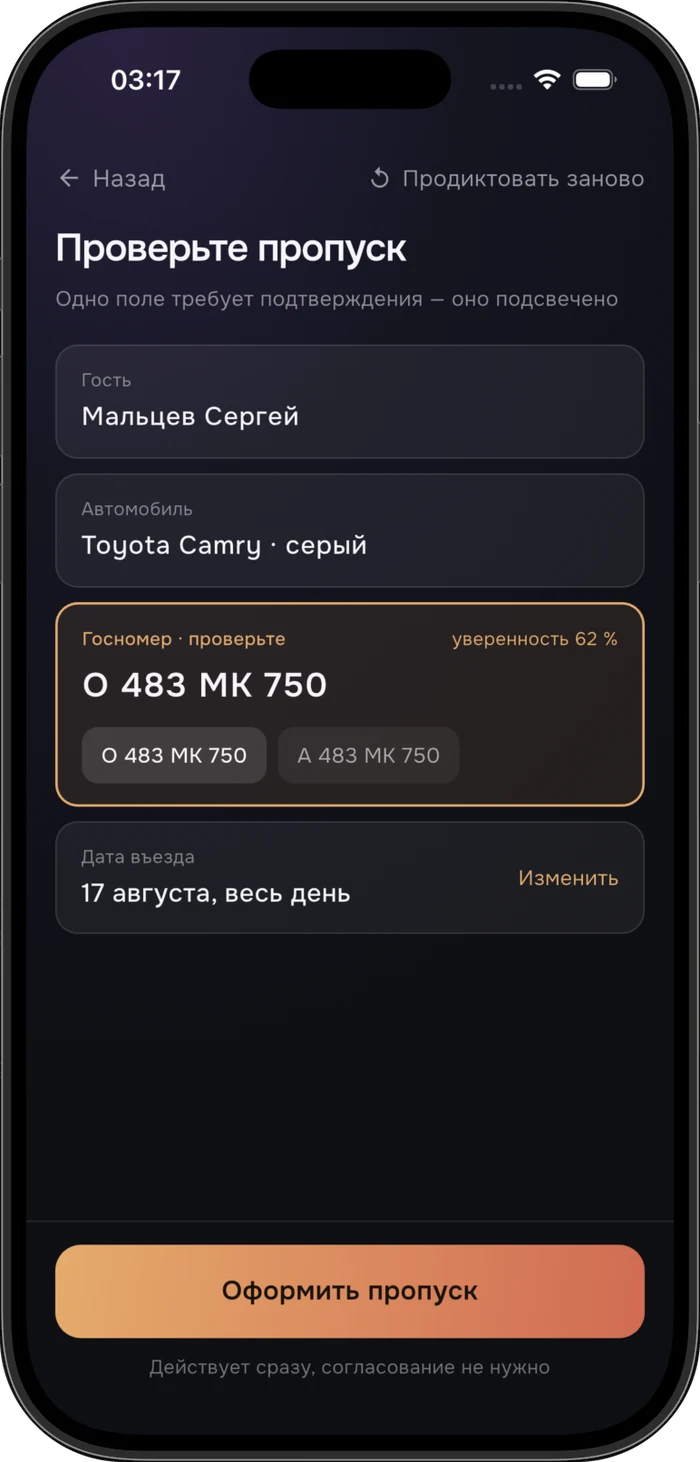
Reviewing the recognised pass: the low-confidence field is highlighted with plate alternatives
A check before issuing
The doubtful field is highlighted, alternatives alongside
The finished pass: plate number, guest, entry date and sending the link to the guest
The finished pass
The camera at the entrance reads the plate itself

A resident sees their balance, downloads an invoice, reads the village news, files requests with the management company and issues a guest pass — by voice, in a single sentence. The management company gets every request in one place instead of scattered across email, messengers and paper notes.

ROLE
Sole developer · mobile and backend
PLATFORMS
iOS · Android
STACK
Flutter · Next.js · PostgreSQL
SCALE
A village of ~200 houses

CHALLENGE

Where it started

The accounting — charges, payments, meters, invoices — already lived in a system the management company uses daily. The resident, however, had no access to their own data at all. Life before the app looked like this:

Every one of these costs a staff member minutes and leaves the resident annoyed. The app closes all four scenarios without a human on the other end.

FOR THE RESIDENT

What the resident gets

01

The balance right on the home screen

Open the app and see it: what's owed or overpaid, and what it came from. Charges and payments in a single feed, like a bank statement.

02

An invoice for any month

Opens on the phone in one tap, ready to forward or print. No need to ask the management company any more.

03

Meter readings

Month by month, with the change from the previous one. It's clear where the invoice total came from, and “why is it so much?” often answers itself.

04

A request instead of a call

The resident picks the recipient — the management company (water, power, roads, waste) or the board (fees, meetings, decisions) — chooses a topic, describes the problem and attaches up to five photos. Photos are compressed on the phone, so the request goes through even on a weak connection.

05

Request status and replies

The resident sees what is happening with their request and reads the staff's replies — nothing has to be chased up twice.

06

Village news

Water shutoffs, owners' meetings, machinery at work. A fresh item is shown the first time the app is opened — it can't be scrolled past.

07

Several properties, one login

Anyone with a house and a garage, or two plots — even in different villages — signs in once and switches between accounts inside the app. The chosen property is remembered across restarts.

08

Call the front desk — when someone is there

During working hours the app shows how late the desk is open today. After closing the button dims and states when it reopens — instead of ringing an empty office.

09

A guest pass by voice in 15 seconds

Instead of six form fields the resident says one sentence: “Sergey Maltsev is coming tomorrow in a grey Toyota Camry, plate O 483 MK 750.” The app breaks it down into guest, car, plate and date. The pass is valid immediately and there is no need to call the gate — the camera at the entrance reads the plate itself.

Recognised it — without pretending to be certain

The number plate is the one field where a mistake leaves the guest stuck at the barrier, and it is also the hardest to transcribe. So the app doesn't hide its uncertainty: a low-confidence field is highlighted, close alternatives sit next to it, and the pass isn't issued until the resident confirms. The remaining fields, where a slip costs nothing, need no confirmation — otherwise voice input would lose its point.
FOR THE MANAGEMENT COMPANY

What changes on the other side

01

Requests stop getting lost

Every request carries a number, a topic, photos and an author. Board requests and management-company requests are kept apart: the board doesn't see maintenance issues and vice versa, and access is configured per staff group.

02

The whole history of a request is visible

Statuses run new → in progress → done. There is also a rejection — but it always requires an explanation: marking “done” on a “please install a street light” request where the light was never going to be installed means lying to the resident. Comments inside a request carry a “visible to resident” flag: working notes for colleagues stay internal, answers reach the resident in the app.

03

Fewer calls about routine questions

Balance, invoice and meter readings — the very things people used to call about — are now something the resident checks themselves.

04

Announcements actually reach people

A news item is written in the admin panel in a minute and published immediately or at a scheduled time — an announcement can be prepared in advance instead of sitting by the computer at the right hour.

05

No parallel bookkeeping

The app shows the same numbers the accountant sees in the system — they are computed by the very same engine. There is never a discrepancy between “in the app” and “in our program”.

06

Access management on the spot

A resident is added automatically when an account with an email address is created. One account can be shared with several people — spouses, grown-up children. Access is revoked with one button and disappears for that person immediately.

SIGNING IN

There is no password at all

The resident enters their email, receives a four-digit code by message — and they're in. No password to invent, memorise or reset.

SECURITY AND DATA

The app handles residents' money

Which is why everything here is done in the boring, reliable way:

STATUS

What's shipped and what's next

Live today

  • Sign-in by emailed code, plus biometrics
  • Balance, charge and payment history
  • Invoices for any month
  • Monthly meter readings
  • Village news
  • Requests with photos and statuses
  • Front desk with opening hours
  • Guest and delivery passes, including by voice

Planned for the next iterations

  • Push notifications — so that news and replies arrive while the app is closed.
  • Paying the bill online straight from the app.

IMPLEMENTATION

Briefly, how it is put together

Mobile
Flutter Dart iOS + Android Face ID · fingerprint
Backend
Next.js PostgreSQL REST API
Infrastructure
Dedicated servers Hosted in Russia

The app does not duplicate business logic

The Flutter app is built on top of an accounting system that already existed. Every calculation stays in that system — which is exactly what guarantees that the resident and the accountant see the same numbers, rather than two different results from two implementations of one formula.

Pace of work

The first working version — from an empty project to code sign-in, live data, news and photo requests — came together in four days. Since then the system ships updates regularly, and every update is described for the client in plain language.

SEE ALSO

CONTACT

Need a similar product?

I'll design and build an app on top of your accounting system — from sign-in and a personal account to requests and notifications. Message me on Telegram — we'll scope the task, timeline and budget.

Message on Telegram dnovoselov@bk.ru

I reply within 3 hours on weekdays

A project's budget and commercial terms belong to the client, and I don't publish them. Your project will be treated the same way. My own price ranges are in the Pricing section.